
Lucky Vegas App and Mobile Casino UK
 Available in GB
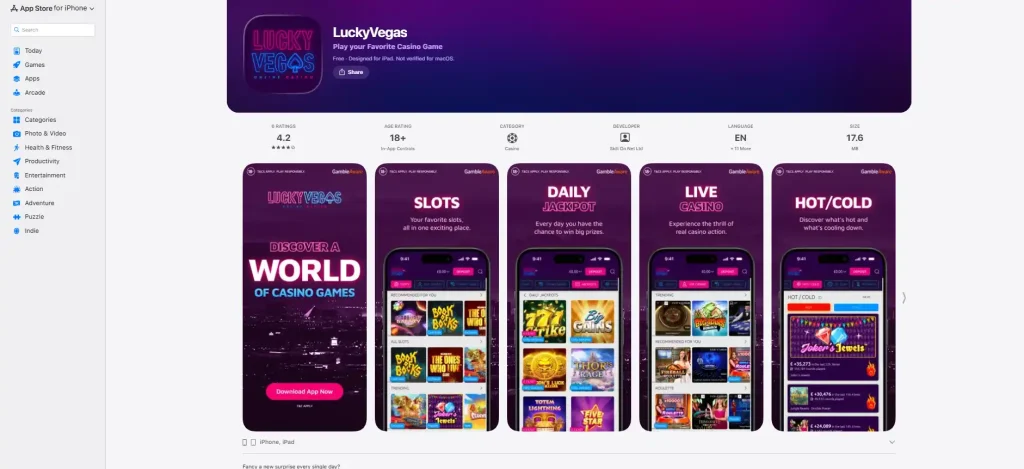
The current LuckyVegas iOS listing is published by Skill On Net Ltd in the UK App Store.
Lucky Vegas currently gives UK users three practical mobile routes: an iOS app, an Android app and the mobile website in a standard phone browser. The iOS version is listed in the UK App Store under Skill On Net Ltd, while an Android app is also available. Players who do not want to install anything can use the mobile browser instead and keep the same account rather than creating a separate mobile profile.
The useful question is therefore not simply whether a Lucky Vegas app exists. It is which route best fits the way you use the casino. A native app can make repeat access feel quicker, while a browser avoids installation and storage use. Whichever route you choose, registration, verification, support and the underlying account remain connected. If you want the broader context first, start with the Lucky Vegas Casino Review.
Lucky Vegas on iPhone and iPad
The UK App Store lists LuckyVegas under Skill On Net Ltd. Check the listing before installing because availability and operating-system requirements can change.
For an iPhone or iPad user, the native app is mainly about convenience. It puts a dedicated icon on the home screen and removes the need to reopen a browser tab each time. The listing indicates that users can sign up or log in to an account and navigate the casino from the app, so the app is part of the same service rather than a disconnected product. If you already use Lucky Vegas on desktop, you do not need a second casino account merely because you switch to iOS.
The practical check before installing is simple: make sure the App Store listing shows the LuckyVegas name and Skill On Net Ltd as the provider. Similar names can exist in app stores, including social-casino or entertainment apps with no connection to the real-money brand. Checking the developer is a more reliable identification step than relying on an icon alone.
An app also has trade-offs. It occupies device storage, depends on the supported operating-system version and may need periodic updates. A browser session avoids those points. That is why the native app is best understood as an access preference, not as a different version of the casino with a separate set of account rules.
Lucky Vegas on Android
Lucky Vegas also has an Android app. For Android users, the same identification principle applies: use the current official distribution route and verify the developer rather than downloading an APK from an unrelated mirror. Casino software is a poor category in which to trade convenience for an unknown download source because the app can involve login credentials, identity checks and payment activity.
The Android option is useful for people who open the casino frequently and prefer an app drawer or home-screen shortcut. It can reduce the small amount of friction involved in opening a browser, finding the saved page and logging in again. For occasional use, that advantage may be too small to matter. A modern mobile browser already handles the same account and is usually the simpler route when you do not want another installed app.
An installed Android app uses the same core casino account. Deposits, withdrawals, verification status and support history belong to the account, not to the handset. If you switch from Android to desktop, or from the app to a browser on the same phone, the important account data should continue with the login rather than starting again.
If the main interest is what can actually be played on a phone, see Lucky Vegas Games and Slots. For live tables specifically, see Lucky Vegas Live Casino.
Mobile browser versus native app
The mobile website is the most flexible route because it requires no installation. Open the Lucky Vegas website in Safari, Chrome or another modern browser, sign in and use the responsive site. This is especially useful on a shared device, a phone with limited storage or a device on which you do not want gambling software installed permanently.
The app is more attractive when you return often and value a dedicated launch point. The browser is more attractive when you want fewer installed apps, easier switching between devices or a quick one-off session. Both routes use the same bankroll and identity record. The account relationship remains the same, so a sensible choice comes down to device habits rather than a supposed difference in casino status.
| Access route | Main advantage | Main trade-off | Best fit |
|---|---|---|---|
| iOS app | Dedicated iPhone/iPad access | Installation and updates | Regular Apple-device users |
| Android app | Dedicated Android access | Installation and updates | Regular Android users |
| Mobile browser | No installation required | You open the site through a browser | Occasional use or low-storage devices |
A browser also makes it easier to verify the web address before signing in. An app has a different verification step: check the store and developer. Both routes can be safe habits when the correct service is identified first.
For new customers, the normal registration process still applies on mobile. The account still has to be created and verified under the same customer rules. Registration details are covered under Lucky Vegas Registration and Account Setup.
Payments, verification and support on mobile
Account controls continue to apply on mobile. Identity, address and relevant payment-method checks remain part of the Lucky Vegas account relationship and can also arise before some withdrawals. The important point for a mobile customer is that these checks belong to the account. Switching from the app to the browser keeps the same identity profile and any existing verification request.
That continuity is useful when a task is easier on another device. For example, you may prefer to read a message or upload a document on a larger screen, then return to the phone later. The device can change while the account remains the same. Exact document requests can vary by case, so account-specific requests remain separate from general verification requirements.
Support is also available through live chat, and Lucky Vegas lists email support at [email protected]. Those channels matter more than a special mobile-only help system. If a payment or account issue appears while using the app, the relevant question is the account issue itself, not whether it happened on iPhone, Android or browser.
For deposits and payment-method choices, use the dedicated Lucky Vegas Payment Methods page. A payment option should be treated as available only when it appears in the account cashier, regardless of which device is being used.
Checking current Lucky Vegas app availability
There is one more practical difference worth considering: how visible you want the casino to be on the device. An installed app leaves an icon and can appear in device-level app lists, while browser use can be less persistent once tabs and history are managed. That offers only limited privacy on the device, and people using shared devices should still sign out properly, but it can matter when choosing how much permanent software to keep on a phone.
Battery use and connection quality are also device questions rather than casino-specific advantages. Both app and browser ultimately need a stable data connection for real-money play, and neither should be assumed to work better on every handset. If one route behaves poorly, trying the other can be a reasonable troubleshooting step before assuming there is an account problem.
Mobile access can change as store listings, supported operating-system versions and distribution routes change. Before installing an app, check the current official listing and developer rather than relying on an older statement about whether an app exists.
App availability can change over time as store listings, supported operating-system versions and distribution routes change. At present, the UK App Store lists LuckyVegas by Skill On Net Ltd, while Android and mobile-browser access provide additional routes.
Before installing, use the official store or distribution route and check the named developer. This is more reliable than relying on an old app name or outdated image.
Choosing between the Lucky Vegas app and mobile browser
One useful way to decide is to separate frequency from functionality. If you open Lucky Vegas several times a week, the app’s home-screen presence may save enough friction to be worthwhile. If you only check the casino occasionally, the browser gives you nearly the same practical access without another install. That distinction is more meaningful than treating an app as automatically better.
Device ownership matters too. On a personal phone, a persistent app may be convenient. On a shared tablet or a work-managed device, browser access can be easier to control. In either case, the account should be signed out when the device is not exclusively yours, and saved credentials should be treated carefully.
Choose the native app when Lucky Vegas is something you expect to open regularly and you value a dedicated icon, a familiar app environment and direct repeat access. Choose the browser when you want to avoid installing another app, use several devices, have limited storage or simply prefer to keep gambling activity inside a browser.
The choice can change over time. You can use the app on one device and a browser on another because the important continuity is the account login, not the access shell. Keep the same basic security habits in both cases: confirm the official service, protect login details, complete account checks when requested and use official support channels if something does not look right.
In most cases, the decision concerns convenience rather than capability. Lucky Vegas currently provides both native-app and browser routes, allowing the access method to match the device and usage pattern.